Nopebook / Independent product
They said no.
You get a
sticker.
A playful job tracker, designed to earn trust.
Explore the case studyI designed and built the interface, interactions, and browser storage, making saving, recovery, and control explicit.
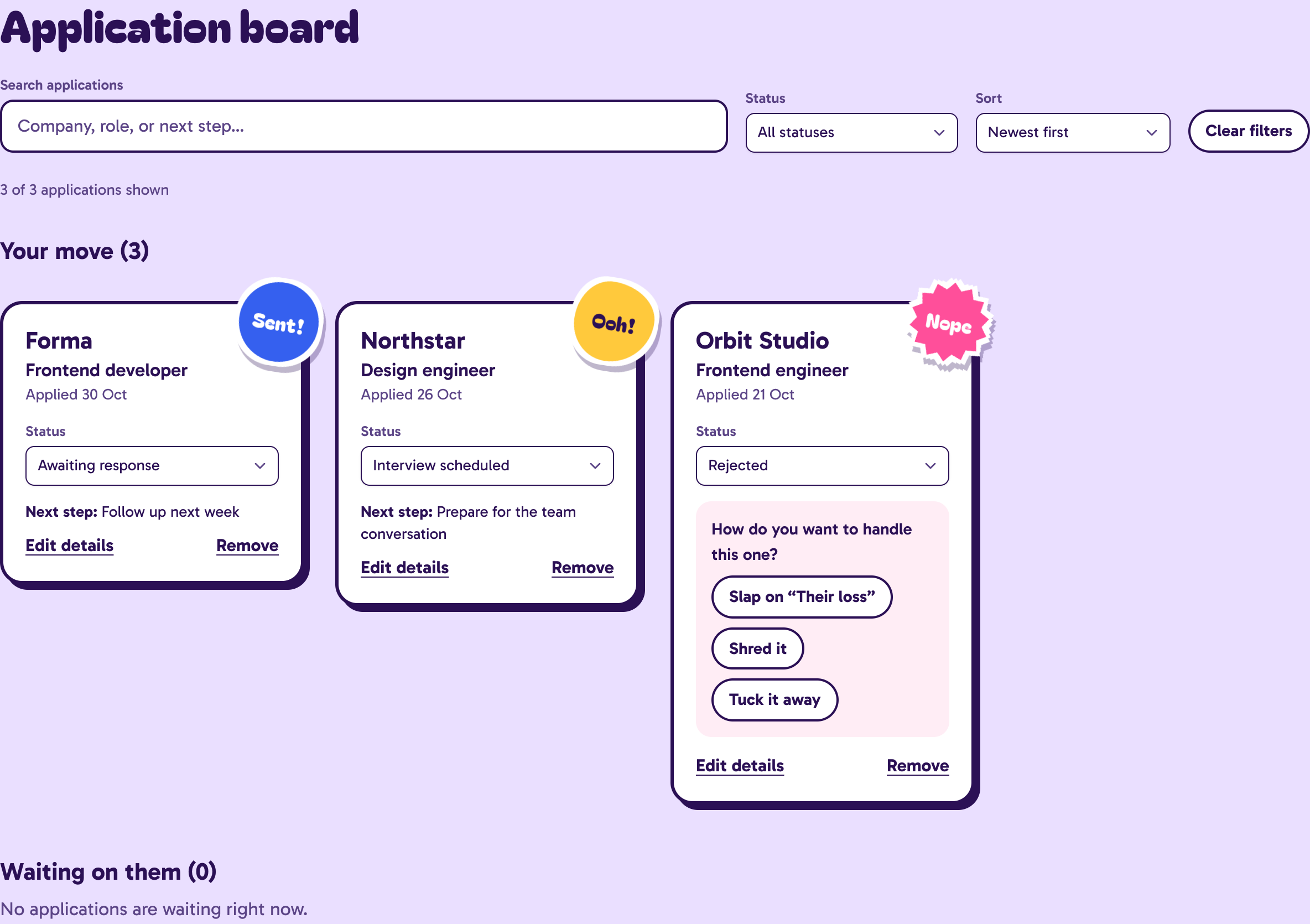
The actual tracker. Fictional applications.
Open full-size image (opens in a new tab)- My role
- Product design & frontend engineering
- Built with
- Next.js, React, TypeScript, Base UI
- Owned end to end
- Interface, interactions, persistence & recovery
Find the next move.
Search the board by company, role, or next step. Filter and sort without leaving the working view.
Act in context.
Update an application, edit its details, or choose a rejection send-off directly from the card.
Keep a way back.
Export a backup, review a replacement before restoring it, and recover a working copy when saving fails.
The brief
Less pressure.
More control.
A job search is already full of waiting, uncertainty, and decisions made elsewhere. I wanted the tracker to help someone find an application and choose their next action, with a lighter way to acknowledge rejection.
The design starts with a searchable board and an always-visible application form. Stickers, a rejection translator, and the album support the task without making returning to the app another obligation.
- No account before the first application.
- The tracker opens straight into the work. Browser storage makes starting simple, with backup and recovery as explicit responsibilities.
- No homework disguised as encouragement.
- No streaks, daily quotas, or leaderboards. The album acknowledges applications and actions the person controls.
- Humor you can turn down.
- Cheeky, gentle, and plain copy share the same application states. Changing the voice doesn’t change the data.
The joke is optional.
Cheeky
“An unexpected casting decision.”
Gentle
“Not this one. You still showed up.”
Plain
Rejected. The status remains; the extra quip disappears.
These are the same rejection state in three voices, using the shared product-copy definitions.
A little closure.
No waiting.
The send-off acknowledges an action. Saving never waits for an animation event. Try a small illustration of that boundary, then reset it or turn motion down.
Try a send-off
Rejected
Orbit Studio
Frontend engineer
Thank you for your time. We’ve decided to move forward with another candidate.
Your move
How do you want to handle this one?
Same rejection, three ways to put it away. Choose a send-off and see its lane change to the back pocket.
The sample application is ready for a send-off.
Sample data. In memory only. This interaction doesn’t access browser storage or the live tracker. Reset it to try another send-off.
The application state changes independently of the animation. In Nopebook, the same boundary keeps a send-off’s visual cleanup separate from the save request.
A playful product,
built around trust.
No account removes a barrier to starting. It also puts recovery, migration, and conflicting edits squarely in the frontend. These are the tradeoffs I chose to make explicit.
Local data, explicit recovery
A versioned browser snapshot with downloadable JSON backups.
Keeping the tracker local removes the sign-up step, but also means there is no automatic cloud recovery. Backup and restore need to be visible parts of the product.
- Alternative considered
- Requiring an account before someone can track an application.
- Evidence
- Storage validation rejects malformed records. Older keys migrate without deleting the originals, and imports preview the application count before replacing the board.
Make conflicts visible
Preserve the working copy and ask the person to resolve a conflicting write.
Two tabs can edit the same saved data. A cheerful interface still needs to explain when it cannot safely save a change.
- Alternative considered
- Silently letting the last browser tab overwrite the board.
- Evidence
- Web Locks serialize cooperating tabs where available. Expected-value checks detect stale writes; without locks, simultaneous writes have weaker guarantees.
State before spectacle
Dispatch the application change independently of its decorative send-off.
Stamping or shredding a rejection should never delay the save request. Animation completion only removes the visual snapshot; a failed save is reported through recovery UI.
- Alternative considered
- Waiting for an animation or timeout to finish before updating an application.
- Evidence
- finishRitual dispatches the change and creates a separate departure snapshot. The controller reports save failures, and reduced-motion mode skips the decorative snapshot.
When saving
isn’t simple.
The recovery interface explains what happened, what is still safe, and what the person can do next. These are captured product states, with their actual actions and limits.
Keep the working copy.
When browser storage is unavailable or full, the new application stays visible in memory. The interface says it is unsaved and offers a backup or another save attempt.
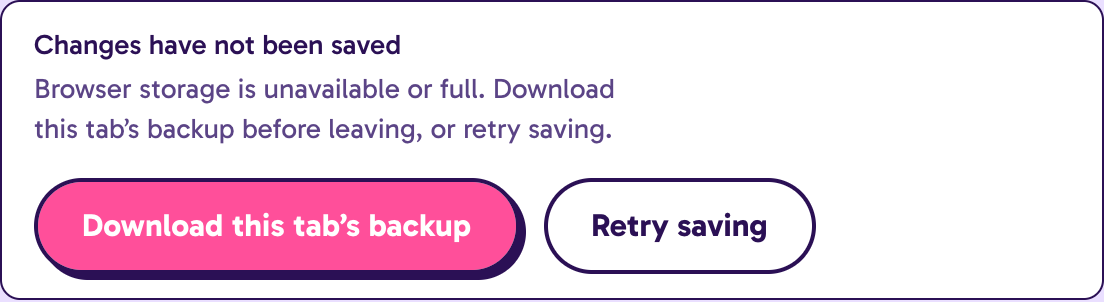
The boundary: Leaving the tab can still lose unsaved changes. A navigation warning and a downloadable backup make that limit explicit.
One action.
Clear boundaries.
I separated product rules, state transitions, persistence, and visual feedback. A rule can be checked without mounting an interface, and a decorative exit can finish without deciding the application’s state.
Rules & voice
Statuses, lanes, and translation patterns define the product’s behavior and language.
game.ts · product-copy.ts
State transitions
Pure transitions receive actions, IDs, and timestamps. They produce the next tracker snapshot.
transitions.ts
Persistence
A per-mounted-tracker controller queues writes, validates data, and reports storage issues.
use-tracker.ts · storage.ts
Interface feedback
Cards, recovery actions, and decorative send-offs reflect the result. Visual cleanup cannot decide whether an action is saved.
tracker-app.tsx · board.tsx
Read three implementation excerpts
A ritual changes application state
The transition records the send-off without depending on a component, timer, or animation event.
src/app/tracker/transitions.tscase 'ritual':
return {
...data,
jobs: data.jobs.map((job) =>
job.id === action.id && job.status === 'rejected'
? { ...job, ritual: action.ritual }
: job
)
};A stale write is a visible conflict
Compare the stored document with the expected value before replacing it. This guard is useful alongside Web Locks; it is not an atomic compare-and-swap across processes.
src/app/tracker/storage.tsif (target.getItem(trackerKey) !== expected)
return { data, raw: expected, issue: 'conflict' };
const raw = serializeTracker(data);
target.setItem(trackerKey, raw);
return { data, raw, issue: null };Dispatch saving; let the decoration follow
The save request and the visual departure have separate lifecycles. The request can still fail; the storage notice handles that outcome.
src/app/tracker/_components/tracker-app.tsxvoid send({ type: 'ritual', id: job.id, ritual });
if (!window.matchMedia('(prefers-reduced-motion: reduce)').matches) {
setDepartures((current) => [
...current.filter((item) => item.job.id !== job.id),
{ job, ritual }
]);
}Test the parts
people rely on.
The repository includes rule and storage tests alongside Playwright browser journeys. The useful evidence is in the behaviors they exercise.
The source repository is not publicly accessible. The source-verified evidence report includes selected implementation and test excerpts from a fixed revision. It records inspected coverage, not a new product test run.
See what the four test areas cover
History & transitions
Status history stays intact, rejection rewards don’t duplicate, and two rituals can commit independently.
src/app/tracker/transitions.test.tsStorage & migration
Malformed imports are rejected, older formats migrate, original recovery copies remain, and stale writes are refused.
src/app/tracker/storage.test.tsReal browser journeys
Reload persistence, canceled restore, failed writes, cross-tab conflicts, keyboard focus, and reduced-motion rituals are covered.
e2e/tracker.spec.ts · PlaywrightContent & viewport stress
Browser journeys exercise long application details at 320, 768, 1024, and 1440 CSS pixels, with automated accessibility checks.
e2e/tracker.spec.ts · Playwright
Automated accessibility checks and viewport captures support review. They don’t replace testing with people, screen readers, or other browser engines. The product retains its owner-selected pink/white brand pairing; the browser suite records that contrast exception explicitly.
What I’d
validate next.
The engineering safeguards are concrete. The emotional and workflow choices are still hypotheses to test with job seekers.
- Validate the tracker workflow with job seekers; the current design decisions are hypotheses, not measured usability outcomes.
- Check Safari and WebKit interactions alongside the existing Chrome journeys.
- Measure production Core Web Vitals before making performance claims.
The next design change I’d test: make backup discoverability clearer near the working board, then check whether someone can recover a failed save without help. A recovery path only earns its place if people can find and use it.